


Enrolment Boost

Childcare website design

Childcare websites that answer families and make enquiring easy.

Families usually visit your website on a phone, between other things, with a handful of questions. We design centre websites that answer them clearly and make booking a tour the obvious next step.

Talk about your website

Rather talk to someone? Call 1300 853 704

In short

A website built around how families choose care.

A good childcare website is not a brochure. It helps a family decide whether your centre might suit them, then makes getting in touch simple. That means real information, real photos, fast pages and forms that work on a phone.

Websites are planned by Martin, who has more than 15 years of sector experience growing childcare centres. About Martin
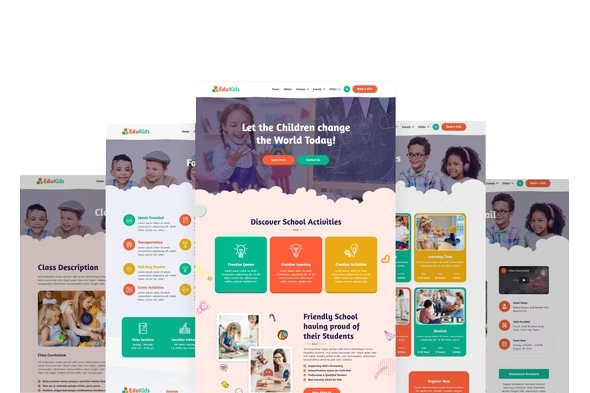
Example layout of a childcare centre website on desktop and mobile

What families look for

The questions your website needs to answer.

What ages and rooms do you have?

Each room, its age range and what a typical day looks like.

How do you approach learning?

Your philosophy and programs, in plain language, with real examples.

Who will look after my child?

Your team, their qualifications and how long they have been with you, with permission.

What are your hours and inclusions?

Opening hours, meals, nappies, excursions and what families need to bring.

What will it cost?

Fee guidance or a clear way to ask, with a note on how Child Care Subsidy affects out-of-pocket costs.

Where are you, exactly?

Address, parking, drop-off, nearby landmarks and public transport.

How do I book a tour?

One obvious button, on every page, that works on a phone.

What we build in

The details that make a centre site work.

  • Mobile-first enquiry. Short forms, tap-to-call and a tour button that is always within reach.
  • Location-specific pages. A dedicated page for each centre with its own facts, photos and tour booking, which also supports local search.
  • Genuine, approved imagery. Real rooms and outdoor spaces, used with consent and your photography policy.
  • Speed and accessibility. Fast loading, readable text, good contrast and forms that work with assistive technology.
  • Integration checks. Confirming enquiries reach your CRM, management system or inbox, and testing it before launch.
  • Search-safe migration. Redirect mapping from old pages to new, so existing links and search visibility are protected as far as possible.

How a build runs

From first conversation to launch.

  1. 01

    Plan

    Agree the pages, centre information, integrations, ownership and costs, and map the current site if you have one.

  2. 02

    Content and photos

    Gather your facts and approved images. We help shape clear, family-friendly wording.

  3. 03

    Design and build

    Build the site, then review drafts with you on desktop and phone.

  4. 04

    Test and launch

    Test forms, integrations, speed and redirects, launch, then check search data in the weeks after.

What your centre provides

Your input keeps it accurate.

  • Centre facts: rooms, ages, hours, inclusions and fees guidance
  • Approved photos, or time for a photo session
  • Your enquiry and tour process, and who receives enquiries
  • Login details for your domain, current site and any systems to connect
  • A decision-maker to review and sign off drafts

Common questions

Questions centres ask us.

Do you improve existing sites, or only build new ones?

Both. If your current site has solid foundations, targeted improvements to content, forms and centre pages may be all you need. If it is slow, hard to edit or confusing on a phone, a rebuild is often better value. We will tell you which we recommend and why.

Will we lose our Google rankings if we move to a new site?

A move always carries some risk, but most of it can be managed. We map every existing page to its new address, set up permanent redirects, keep useful content and check Search Console after launch. We cannot guarantee rankings will not move, but careful planning protects the traffic you have earned.

What do we need to provide?

Accurate centre information, approved photos of your rooms, spaces and team, your enquiry and tour process, and a person who can review drafts. We help shape the words, but the facts need to come from you.

Who owns the website and what are the ongoing costs?

Ownership, hosting, domain, software licences and support costs are confirmed in writing before the project starts, so there are no surprises after launch.

Can the website connect to our CRM or management system?

Often, yes, but it depends on the system. We check what your system supports, test the connection and confirm enquiries arrive correctly before launch. If a direct connection is not possible, we set up a reliable alternative such as email notification.

Can we use stock photos?

We strongly recommend real photos of your centre, taken with consent and following your photography policy. Families can tell the difference, and genuine images build far more trust.

Planning a new website or a refresh?

Tell us about your current site and centres, and we will talk through what would make the biggest difference.

Rather talk to someone? Call 1300 853 704

Related services

Other ways we help.

Find out where your centre is losing enrolment opportunities.

Take the free Occupancy Health Audit and see your results straight away. If you’d like, Martin will then record a personal video review of your results within one to two business days.

Instant results. Optional personal video. No obligation.

Free Occupancy Health Audit

Find out where your centre is losing enrolment opportunities.

Answer a short questionnaire about your centre and see your results instantly.

  • See your results straight away, no contact details needed
  • Optional personal video review from Martin within one to two business days
  • Free, with no obligation
Take the Occupancy Health Audit

Rather talk to someone? Call 1300 853 704