
Seven practical ways to make your childcare website turn parent visits into tour bookings, from cost after CCS to speed on a phone.
Updated 14 October 2026.
A childcare website turns visits into enrolments when a parent on a phone can answer three questions in under a minute: is this centre near me and right for my child's age, what will it cost me after the Child Care Subsidy, and how do I book a tour? Everything else on the site should support those answers, not compete with them.
What parents are trying to work out on your website
Parents arrive on your website from Google, your Business Profile or a Facebook ad, often on a phone. They are not reading every page. They are checking whether you are worth a tour. If they can't quickly find your location, ages, fees and a way to book, they go back to the search results and try the next centre.
So the job of your website isn't to say everything about your centre. It's to get the right families to book a tour, and then let the tour do the rest. Our childcare tour guide covers that next step.
7 ways to turn your childcare website into tour bookings
1. Make the top of the page do the work
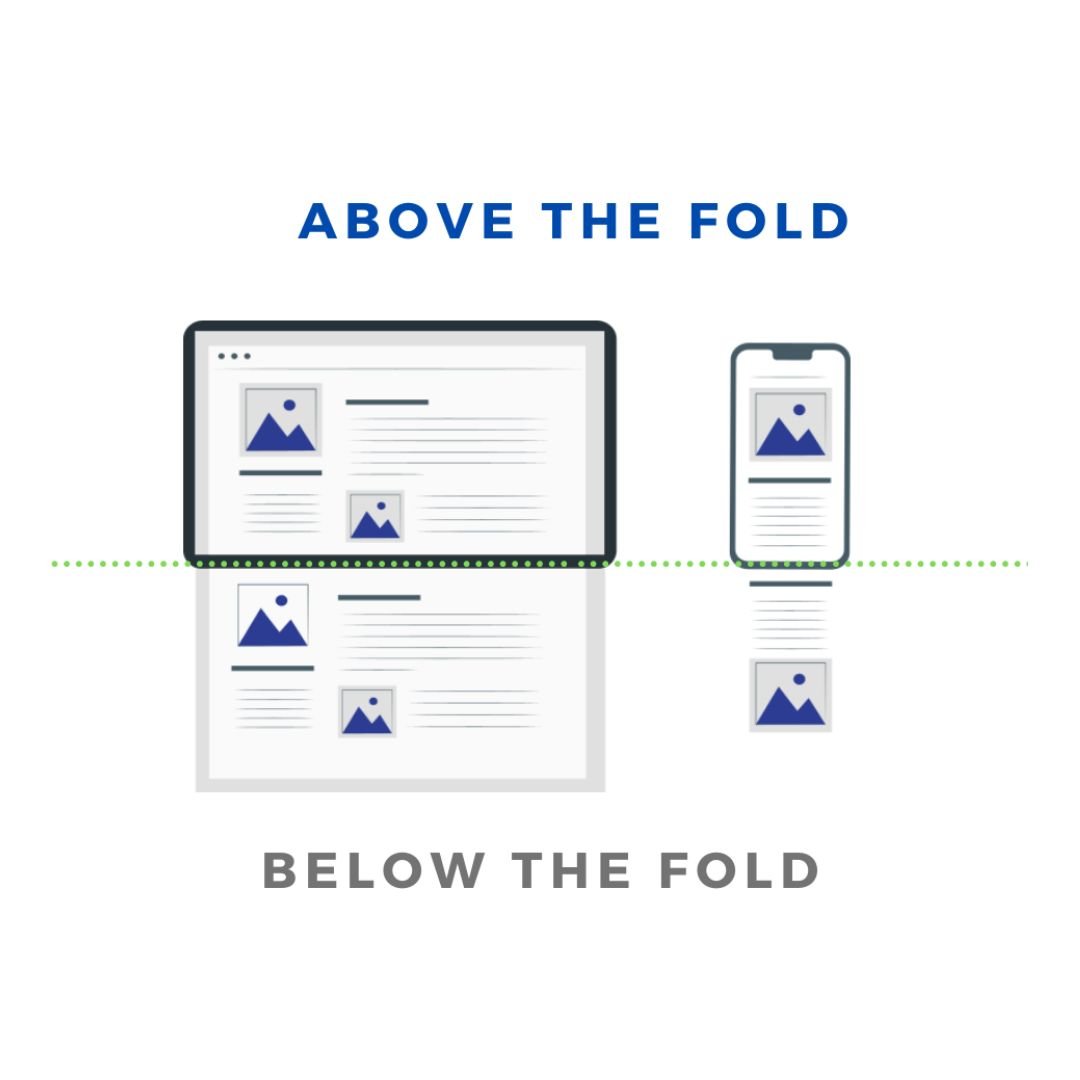
The top of the page, before anyone scrolls, should tell a parent where you are, who you care for and what to do next. On a phone that space is small, so keep it to:
- a headline with your centre name and suburb
- the ages you take, such as six weeks to school age
- one real photo of your centre, not stock
- one button: "Book a tour"
 Open full size
2. Show the cost after the Child Care Subsidy
A daily fee of $150 or more can scare off a family who would actually pay far less after the Child Care Subsidy. Show your daily fee and what a family might pay after CCS, or add a CCS gap fee calculator set up with your fees. Since January 2026, every CCS-eligible family gets at least 72 subsidised hours a fortnight under the 3 Day Guarantee, so say that clearly too.
3. Be honest about availability
Families want to know whether you have places on the days they need. Show availability by room or age group where you can, and keep it current. Never claim places are "nearly gone" if they aren't. If you are full, offer a waitlist and explain how it works. Our waitlist review guide helps keep that list useful.
4. Use real photos and real families
Show your rooms, outdoor spaces and educators, with their permission. Children only appear with the family's written consent and in line with your photo policy, which our guide to childcare photos and AI covers.
When you show parent reviews, include the parent's photo with their permission. A real face makes a review far more believable than an anonymous quote. Our guide to childcare reviews explains how to collect them fairly.
5. Make booking a tour easy
- Put a "Book a tour" button on every page, in the same place.
- Let parents choose a tour time online, at any hour.
- Keep the enquiry form short: name, phone, email, child's age, the days they need and their preferred start date.
- Make the phone number tap-to-call on mobile.
- Send an instant confirmation with the date, time, address and parking details.
Once the enquiry comes in, reply within a business day. Our enquiry follow-up service covers this part of the process.
6. Make it fast on a phone
A slow page loses parents before they see anything. Google's Core Web Vitals set the benchmark: the main content should load within 2.5 seconds, the page should respond to a tap within 200 milliseconds, and the layout shouldn't jump around as it loads. Compress large photos, remove plugins you don't use, and test your pages on PageSpeed Insights.
7. Give each centre its own page
If you run more than one centre, each one needs its own page with its suburb, address, phone number, hours, ages, photos and tour booking. It helps parents find the right centre, and it helps Google show the right centre in local search. Our local SEO guide for childcare centres explains how.
Track tours and enrolments, not just visits
Website visits don't fill rooms. Set up tracking so you can see how many enquiries and tour bookings the website produces, and where those families came from. Then follow each one through to a tour and an enrolment. Our article on childcare ads that lead to enrolments shows how.
When the website and follow-up work together, the results show up in occupancy. In one Melbourne long day care centre, 28 enquiries over four months led to 20 booked tours, and reported occupancy moved from 71% to 84% with consistent follow-up and tours alongside the ads.
If your website needs more than a few fixes, see our childcare website design service. To find out where your centre is losing families now, take the free Occupancy Health Audit.
Frequently asked questions
What should a childcare centre website include?
Your centre name and suburb, the ages you take, real photos, your fees and an estimate of the cost after the Child Care Subsidy, availability by room, parent reviews with photos, a short enquiry form and a way to book a tour online. Multi-site groups need a separate page for each centre.
How can a childcare website increase enrolments?
By making it quick for the right families to book a tour. Show location, ages, cost after CCS and availability near the top, put a "Book a tour" button on every page, make the site fast on a phone, and reply to every enquiry within a business day.
How fast should a childcare website load?
Google's Core Web Vitals guidance says the main content should load within 2.5 seconds, the page should respond to a tap within 200 milliseconds, and the layout should stay stable while it loads. Test your pages with Google's PageSpeed Insights.
Should a childcare website show fees?
Yes. Show your daily fee and what a family might pay after the Child Care Subsidy, or use a CCS gap fee calculator. A realistic cost helps a family decide whether a tour is worth their time, instead of guessing.